
Your Google Business Profile (formerly Google My Business) is arguably the most powerful free marketing tool available to Lahore businesses. When optimized correctly, it can put your business in front of thousands of local customers actively searching for what you offer—without spending a rupee on advertising.
This guide walks you through exactly how to optimize your Google Business Profile to dominate local search results in Lahore.
Why Google Business Profile Matters for Lahore Businesses
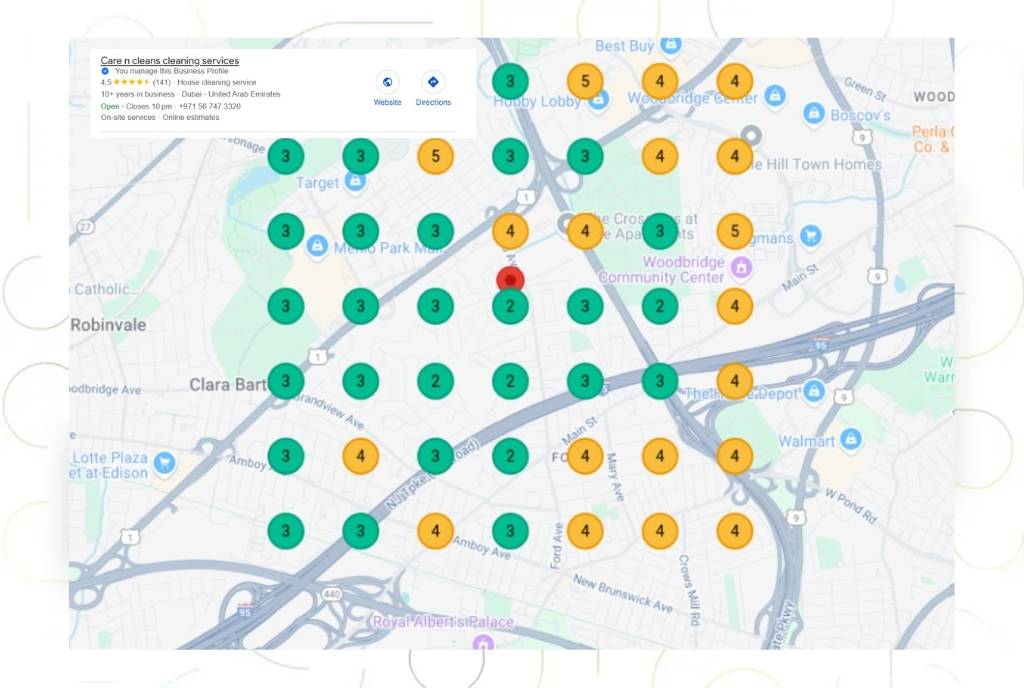
When someone in Lahore searches for “restaurant near me,” “plumber in DHA,” or “best salon in Gulberg,” Google shows a map with three businesses—called the Map Pack or Local 3-Pack. These three positions receive the majority of clicks.
Your Google Business Profile determines whether you appear in these coveted positions.
The Numbers Don’t Lie:
- 76% of people who search for something nearby on mobile visit a business within 24 hours
- 28% of local searches result in a purchase
- Businesses with complete Google Business Profiles receive 7x more clicks than incomplete profiles
- 86% of consumers use Google Maps to look up local businesses
For Lahore businesses, this is even more critical because:
- Mobile search dominates (over 75% of searches)
- “Near me” searches have grown 500% in recent years
- Local competition is fierce—small optimizations make big differences
- Many Lahore businesses still haven’t optimized their profiles, giving early adopters an advantage
Setting Up Your Google Business Profile
Step 1: Claim Your Business
- Go to google.com/business
- Search for your business name
- If it exists, click “Claim this business”
- If it doesn’t exist, click “Add your business to Google”
- Fill in your business information accurately
Step 2: Verify Your Business
Google requires verification to ensure you’re the legitimate owner:
Postcard Verification (most common):
- Google mails a postcard to your business address with a verification code
- Enter the code when it arrives (typically 5-7 days in Lahore)
- Don’t change your business information while waiting—it can delay verification
Phone Verification (available for some businesses):
- Receive a code via phone call or SMS
- Enter immediately to verify
Email Verification (available for some businesses):
- Receive code via email
- Enter to verify
Video Verification (newer option):
- Record a video tour of your business
- Submit for Google review
Pro tip: Don’t create duplicate listings if verification is slow. Multiple listings can confuse Google and customers.
Step 3: Complete Every Single Field
Google rewards complete profiles with better rankings. Here’s what to fill out:
Optimizing Your Business Information
Business Name
Do:
- Use your exact legal business name
- Keep it consistent with your website, signage, and other directories
Don’t:
- Add keywords (e.g., “ABC Restaurant – Best Biryani in Lahore”)
- Include location unless it’s part of your official name
- Use all caps or special characters
Why it matters: Keyword stuffing in business names can result in suspension. Use your actual business name only.
Primary Category
This is crucial—it determines which searches you appear in.
How to choose:
- Select the single category that best describes your business
- Be as specific as possible
- “Pakistani Restaurant” beats “Restaurant” for a desi food place
- “Real Estate Agency” beats “Business Consultant” for a property dealer
Common Lahore categories:
- Restaurants: Pakistani Restaurant, Fast Food Restaurant, Barbecue Restaurant, Cafe
- Services: Digital Marketing Agency, Law Firm, Accounting Firm, Medical Clinic
- Retail: Clothing Store, Electronics Store, Furniture Store, Grocery Store
- Automotive: Car Dealer, Auto Repair Shop, Car Wash
You can add additional categories, but primary category matters most.
Business Description
You have 750 characters to tell potential customers what you do:
Structure:
- First sentence: What you do and who you serve
- Second sentence: What makes you different
- Third sentence: Call to action
Example for a Lahore restaurant: “Serving authentic Lahori cuisine since 1995, we specialize in traditional BBQ and karahi prepared using family recipes passed down three generations. Located in the heart of Gulberg, we’re known for our signature beef pulao and charcoal-grilled tikka. Visit us for dine-in or order delivery across Lahore.”
Tips:
- Include location (Gulberg, DHA, Johar Town, etc.)
- Mention specialties
- Keep it natural—write for customers, not search engines
- Update seasonally if relevant (e.g., winter wedding packages)
Service Area (if applicable)
If you serve customers at their location (plumbers, delivery restaurants, home services):
- Specify exact areas you serve
- Don’t claim areas you can’t serve—Google checks
- For Lahore businesses: list specific neighborhoods or use radius from your location
- Most Lahore service businesses serve: Gulberg, DHA, Cantt, Johar Town, Model Town, etc.
Business Hours
Critical details:
- Set regular hours accurately
- Update special hours for holidays (Eid, national holidays)
- Use “Open 24 hours” if applicable
- Mark days you’re closed
Why it matters: Nothing frustrates customers more than showing up to a closed business. Accurate hours build trust.
Pro tip: Many Lahore businesses forget to update hours during Ramadan. Set this in advance.
Attributes
These help customers understand your business quickly:
For Restaurants:
- Dine-in, Takeout, Delivery
- Outdoor seating, Wheelchair accessible
- Good for groups, Good for kids
- Accepts reservations, Wi-Fi available
For Services:
- Online appointments, Online classes
- Wheelchair accessible
- LGBTQ+ friendly (if applicable)
For Retail:
- In-store pickup, In-store shopping
- Delivery, Same-day delivery
- Wheelchair accessible
Select all that apply—these appear in search results and influence customer decisions.
Visual Optimization: Photos and Videos
Photos are the most engaging element of your Google Business Profile.
Photo Requirements and Best Practices
Exterior Photo:
- Clear shot of your storefront or building
- During the day with good lighting
- Shows signage clearly
- High resolution (720p minimum)
Interior Photos:
- Clean, well-lit shots
- Show what customers experience
- Multiple angles for restaurants/retail
Product Photos (for restaurants/retail):
- High-quality close-ups
- Natural lighting preferred
- Showcasing your best items
Team Photos:
- Professional but approachable
- Humanize your business
- Doctors, lawyers, salons benefit especially
Video Content:
- 30-second business tour
- Product demonstrations
- Customer testimonials
- Behind-the-scenes content
Quantity Matters
Businesses with:
- 100+ photos get 520% more calls
- Videos get 2.7x more requests for directions
Upload schedule:
- Minimum: 10 photos at setup
- Goal: 50+ photos within first month
- Ongoing: Add 5-10 new photos monthly
Photo Tips for Lahore Businesses
- Restaurants: Upload every menu item with professional photos
- Retail: Show seasonal inventory
- Services: Before/after photos work incredibly well
- Events: Post photos from events, launches, celebrations
- Cultural relevance: Include photos from Eid, national day celebrations
Managing and Responding to Reviews
Reviews are ranking signals AND influence customer decisions.
Getting More Reviews
The Ask: Most customers won’t review unless you ask. Make it easy:
In-person: “We’d appreciate if you could leave us a Google review. Would you mind taking a moment?”
Post-service email: “Thanks for choosing [Business Name]! We’d love to hear about your experience. Could you take 30 seconds to leave us a Google review? [Direct Link]”
SMS follow-up: “Hi [Name], thanks for visiting [Business]! Please share your experience: [Review Link]”
QR codes: Print QR codes at checkout, on receipts, or table tents that link directly to your review page
How to Get the Review Link
- Open your Google Business Profile
- Click “Get more reviews”
- Copy the short link (goo.gl/…)
- Share via email, SMS, or print
Responding to Reviews
Positive Reviews:
- Respond to every single one
- Within 24-48 hours
- Personalize responses (mention specific details)
- Thank them genuinely
- Invite them back
Example: “Thank you so much, Ahmed! We’re thrilled you enjoyed our beef karahi. It’s prepared fresh daily using my grandmother’s recipe. We look forward to serving you again soon!”
Negative Reviews:
- Respond even faster (within 24 hours)
- Stay professional and empathetic
- Apologize for their experience
- Offer to resolve offline
- Never argue or get defensive
Example: “We sincerely apologize for your disappointing experience, Fatima. This doesn’t meet our standards. Please call me directly at [number] so I can make this right. We’d love another opportunity to serve you properly. – [Name], Manager”
Why responding matters:
- Shows potential customers you care
- Can turn negative experiences into loyalty
- Signals to Google you’re an active business
- 89% of consumers read business responses to reviews
Review Guidelines
Don’t:
- Offer incentives for reviews (against Google policy)
- Create fake reviews
- Have employees review on company devices
- Review bomb competitors
Do:
- Make it easy for happy customers to review
- Respond to every review
- Learn from negative feedback
- Showcase reviews on your website
Google Posts: Free Advertising
Google Posts appear in your business profile and search results. Use them strategically:
Post Types
What’s New:
- Announcements
- New products/services
- Special achievements
Event:
- Grand openings
- Sales events
- Holiday hours
Offer:
- Limited-time discounts
- Special promotions
- Seasonal deals
Post Best Practices
Content:
- 150-300 words (concise but informative)
- Include a call-to-action
- Use emojis sparingly for visual interest
- Add a photo or video
Frequency:
- Minimum: Weekly
- Ideal: 2-3 times per week
- Restaurants: Daily specials work great
CTAs:
- Order Online
- Book Now
- Learn More
- Sign Up
- Call Now
Example Posts for Lahore Businesses
Restaurant: “Today’s Special: Mutton Karahi 🍖 Slow-cooked mutton in our signature tomato-based karahi. Served with naan, raita, and salad. Only PKR 1,800 for a full plate! Available for dine-in and delivery across Gulberg. Order now: [phone]”
Salon: “Bridal Package for March Weddings 👰 Complete bridal makeup + hair styling + mehndi Limited slots available! Book your appointment: [phone]”
Real Estate: “Just Listed: 10 Marla House in DHA Phase 6 🏡 3 bedrooms, modern kitchen, beautiful garden PKR 5.5 Crore Schedule a viewing: [phone]”
Q&A Section Optimization
The Questions & Answers section lets customers ask about your business—and gives you opportunity to provide helpful information.
Proactive Q&A Strategy
Don’t wait for questions. Add common questions yourself:
For Restaurants:
- “Do you offer delivery?”
- “What are your most popular dishes?”
- “Do you have vegetarian options?”
- “Is there parking available?”
- “Do you accept reservations?”
For Services:
- “What areas do you serve?”
- “How much do your services cost?”
- “How quickly can you start?”
- “Do you offer free consultations?”
- “What’s your experience with [specific issue]?”
Answer format:
- Be specific and helpful
- Include keywords naturally
- Keep answers concise (2-3 sentences)
- Update as information changes
Monitoring Questions
Enable notifications for new questions, then:
- Answer within 24 hours
- Correct misinformation from other users
- Thank users for good questions
- Use answers to address common objections
Products and Services Section
If you sell specific products or services, add them:
Service Businesses
List each service with:
- Service name
- Description (150-300 words)
- Price or price range
- Service category
Example for digital marketing agency: Service: “SEO Services lahore” Category: “Digital Marketing” Price: “Starting from PKR 50,000/month” Description: “Comprehensive SEO including keyword research, on-page optimization, link building, and monthly reporting. Customized strategies for Lahore businesses.”
Retail/Restaurants
Add individual products:
- Product name
- Photo (high quality!)
- Category
- Price
- Description
This creates a mini-catalog in your Google profile, improving visibility.
Messaging Feature
Enable messaging to let customers contact you directly through Google:
Setup:
- Enable messaging in Google Business Profile
- Download the Google Business Profile app
- Set up automated welcome message
- Respond quickly (within 1 hour for best results)
Best practices:
- Average response time shows publicly—keep it low
- Use quick replies for common questions
- Move phone calls or appointments out of messaging
- Professional but friendly tone
Insights and Analytics
Google provides valuable data about how customers find and interact with your profile:
Key Metrics to Track
Discovery:
- How many people found your profile through Direct searches (searching your name) vs Discovery searches (searching category/service)
- Goal: Increase discovery searches = new customer acquisition
Actions:
- Website clicks
- Direction requests
- Phone calls
- Message sends
Photo Views:
- Which photos get viewed most
- Helps you understand what interests customers
Direction Requests:
- Where customers come from geographically
- Helps understand your actual service area
Using Insights
Review monthly:
- Which keywords drive discovery?
- What actions do customers take most?
- Are phone calls increasing?
- Which posts perform best?
Adjust strategy based on data:
- If directions are requested often, optimize location description
- If calls are low but website clicks high, improve CTAs for phone calls
- If certain photos get viewed most, add similar content
Advanced Optimization Techniques
Service Area Pages
For multi-location businesses or those serving multiple Lahore areas:
- Create location-specific landing pages on your website
- Link from Google Business Profile
- Mention specific neighborhoods in profile
Booking Integration
If applicable, integrate booking systems:
- Google Reserve for appointments
- OpenTable for restaurants
- Direct booking reduces friction
Product Feeds
For e-commerce businesses:
- Sync product catalog with Google
- Products appear in Google Shopping and Maps
- Updates automatically
Common Mistakes Lahore Businesses Make
1. Inconsistent NAP (Name, Address, Phone)
Your business information must be identical everywhere:
- Google Business Profile
- Website
- Other directories
Different spellings, abbreviations, or phone numbers confuse Google and hurt rankings.
2. Choosing Wrong Category
Don’t pick a category based on what you think will rank better. Pick what accurately describes your business.
3. Not Responding to Reviews
Ignoring reviews signals you don’t care about customers. Always respond.
4. Using Low-Quality Photos
Blurry, dark, or poor-quality photos hurt more than help. Invest in decent photography.
5. Incomplete Business Hours
Leaving hours blank or outdated frustrates customers and costs you business.
6. Never Posting
An inactive profile signals a potentially inactive business. Post regularly.
7. Keyword Stuffing in Business Name
This violates Google’s guidelines and can get you suspended.
8. Creating Duplicate Listings
Multiple listings for one business splits your reviews, photos, and authority.
Measuring Success
Track these metrics monthly:
Visibility Metrics:
- Search impressions (how often your profile appeared)
- Profile views
- Discovery vs direct searches ratio
Engagement Metrics:
- Website clicks
- Phone calls
- Direction requests
- Photos viewed
Conversion Metrics:
- Customer actions (calls, bookings, visits)
- Review count and average rating
- Response time to messages
Competitive Metrics:
- Map Pack rankings for target keywords
- Review count vs competitors
- Photo count vs competitors
Next Steps
Your Google Business Profile optimization checklist:
Week 1:
- Claim and verify your listing
- Complete all business information fields
- Upload 10+ high-quality photos
- Set accurate business hours
Week 2:
- Add all products/services
- Create first 5 Google Posts
- Set up messaging
- Add Q&A content
Week 3:
- Request reviews from recent customers
- Respond to all existing reviews
- Add more photos (goal: 25+)
- Create weekly posting schedule
Ongoing:
- Post 2-3 times weekly
- Add 5-10 new photos monthly
- Request reviews consistently
- Respond to reviews within 24 hours
- Update special hours for holidays
- Monitor insights monthly
Conclusion
Your Google Business Profile is your digital storefront. In a city as competitive as Lahore, proper optimization can mean the difference between thriving and struggling to find customers.
The businesses dominating the Map Pack didn’t get there by accident. They invested time in optimization, consistently engaged with customers through reviews and posts, and provided the information Google and customers need.
Start implementing these strategies today. Every week you delay is another week your competitors are capturing the customers searching for exactly what you offer.
Related Resources:
- Complete Guide to SEO Services in Lahore
- Local SEO Ranking Factors in Pakistan
- How to Get More Google Reviews for Your Lahore Business
- Google My Business FAQs for Pakistani Businesses