
GUIDE
9 MIN READ
You search for your service in ChatGPT, Perplexity, or Google’s AI Mode, and the answer names three competitors but not you. That is frustrating, especially when your site ranks on Google. The good news is that the causes are usually specific and fixable.
This guide walks through the most common reasons a business doesn’t appear in AI search results, how to check each one, and what to fix first.
How AI Search Tools Choose Which Businesses to Mention
AI assistants such as ChatGPT search, Perplexity, Gemini, and Google’s AI Overviews and AI Mode don’t keep a separate list of approved businesses. When they search the web, they look for pages that answer the question, then summarize what they find and link to some of the sources.
Google says pages need no special optimization to appear in AI Overviews or AI Mode: a page must be indexed and eligible to show with a snippet, and the usual SEO best practices apply (see Google’s guide to AI features). Google also says these features may run several related searches, a technique it calls “query fan-out”, to build one answer. So a business that covers a topic well across several pages has more chances to be picked up.
Reason 1: AI Crawlers Are Blocked
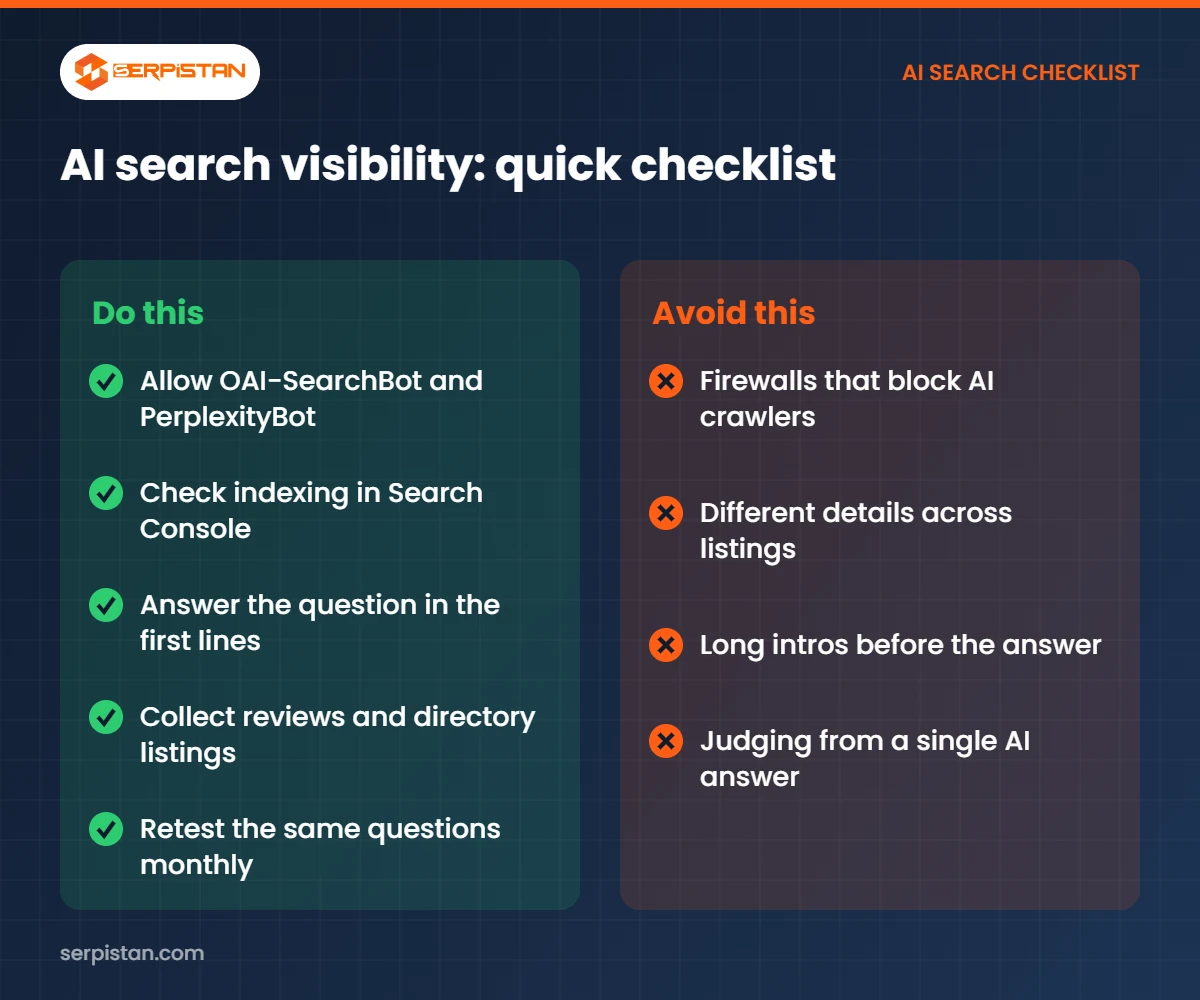
Each AI search tool uses its own crawler. If your robots.txt file, firewall, or CDN blocks it, your pages can’t be shown.
| Tool | Crawler to allow | What it controls |
|---|---|---|
| ChatGPT search | OAI-SearchBot | Whether pages can appear in ChatGPT search answers |
| Perplexity | PerplexityBot | Whether pages can appear and be linked in Perplexity results |
| Google AI Overviews and AI Mode | Googlebot | Same as normal Google Search |
| Gemini Apps grounding | Google-Extended | Whether Google can use your content to ground answers in Gemini Apps |
OpenAI says sites that block OAI-SearchBot won’t be shown in ChatGPT search answers, apart from navigational links (OpenAI’s crawler documentation). Perplexity recommends allowing PerplexityBot to appear in its results (Perplexity’s crawler documentation). Security tools such as bot-fight modes can block these crawlers even when robots.txt allows them, so check your firewall settings too.
Reason 2: Your Pages Aren’t Indexed
Google’s AI features only use pages that are indexed in Google Search. Open the Page indexing report in Google Search Console and check that your key service and location pages are indexed. If they show “Crawled – currently not indexed” or “Discovered – currently not indexed”, improve the content and add internal links to those pages.
Reason 3: Your Content Doesn’t Answer the Question
AI answers quote passages that answer a question directly. Many service pages describe the business but never answer what a buyer asks, such as cost, timelines, or how to choose a provider.
- Put a one- or two-sentence answer near the top of each page.
- Use the questions people ask as headings, then answer them in the first lines below.
- Add specific details: services, areas served, process, pricing ranges where you can share them, and real examples.
- Add a short FAQ with FAQ schema that matches the visible text.
Our guide on content that ranks in AI answers covers formatting in more detail.
Reason 4: Few Trusted Mentions Elsewhere
When an AI tool answers “best [service] in [city]”, it often draws on lists, reviews, directories, and news articles rather than your own site. If those sources don’t mention you, you are unlikely to appear.
- Collect Google reviews regularly and reply to them.
- Get listed in the main directories for your industry and city.
- Ask partners, suppliers, and associations to list you on their sites.
- Pitch useful expert comments to local and industry publications.
Reason 5: Inconsistent Business Information
If your name, address, phone number, or services differ between your website, Google Business Profile, and directories, AI tools may not connect the mentions to one business. Use the same details everywhere and keep your Google Business Profile up to date. See business listings for SEO.
How to Check Where You Stand
- Ask ChatGPT, Perplexity, Gemini, and Google AI Mode the questions your customers ask, and note who gets mentioned and which pages are cited.
- Check your robots.txt and firewall settings for the crawlers above.
- Check indexing for your key pages in Search Console.
- Compare your pages with the cited pages: what do they answer that you don’t?
- Repeat the same questions monthly and keep a simple log. AI answers change, so look for trends rather than single results.
Getting Help with AI Search Visibility
SERPISTAN helps businesses become easier for AI tools to find and cite, through answer engine optimization (AEO) and generative engine optimization (GEO). Agencies can also resell the service through our white label AEO program.
Frequently Asked Questions
Why doesn’t ChatGPT mention my business?
Common reasons are that OAI-SearchBot is blocked in robots.txt or by a firewall, your pages don’t answer the question clearly, or few trusted websites mention your business. OpenAI says sites that block OAI-SearchBot won’t be shown in ChatGPT search answers.
Do I need special markup to appear in Google AI Overviews?
No. Google says there are no additional requirements or special schema for AI Overviews or AI Mode. The page must be indexed and eligible to show with a snippet in Google Search.
Does blocking Google-Extended remove me from Google Search?
No. Google says Google-Extended does not affect inclusion in Google Search and is not a ranking signal. It controls whether content can be used for Gemini model training and for grounding in Gemini Apps.
How long does it take to appear in AI answers?
OpenAI and Perplexity say robots.txt changes can take about 24 hours to be reflected. Content and reputation improvements usually take longer, often weeks to months, because pages need to be recrawled and mentioned elsewhere.
Can I pay to appear in AI search answers?
Organic AI answers can’t be bought. Some platforms now offer ads, but those are labeled separately from the answer itself.